Overview of Document Templates
Learn what document templates are and how they work for invoices, proposals, and contracts in Cura.
What Are Document Templates?
Document templates in Cura let you define reusable layouts and content for the documents you send to clients: invoices, proposals, and contracts. Each template includes your branding (logo, colors, fonts) and the body content you write. When you generate a document from a job, Cura merges the template with job-specific data (e.g. client name, line items, totals).
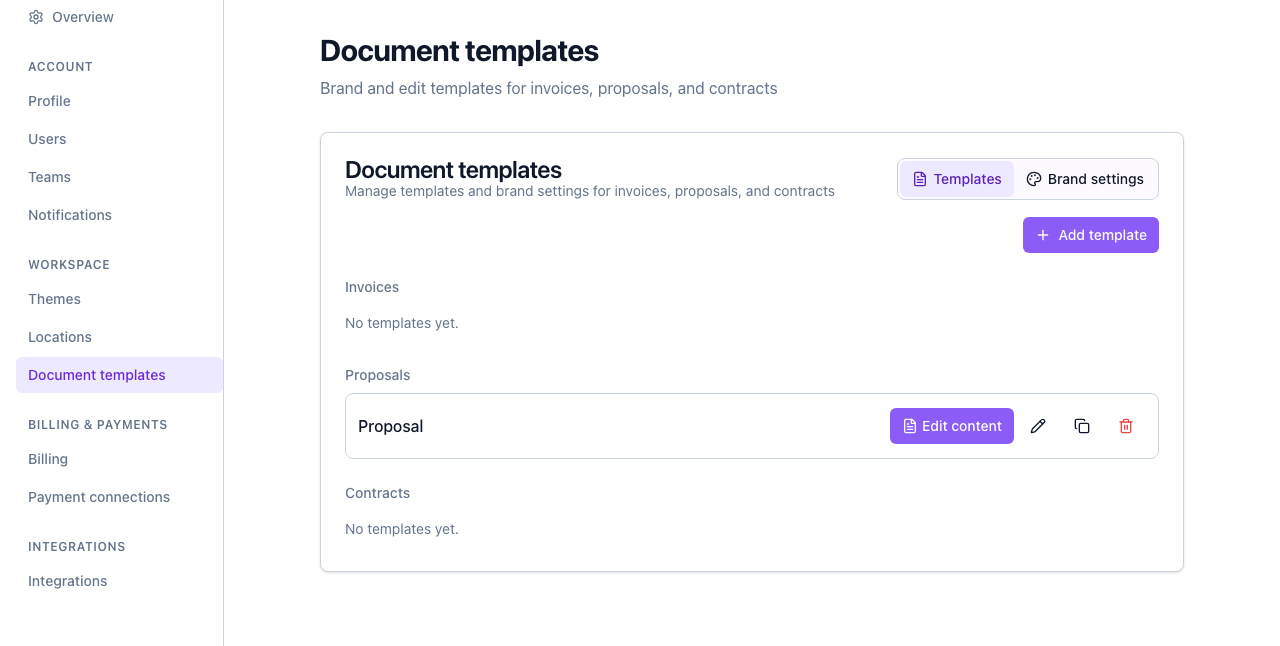
Where to Find Document Templates
- Open Settings from the sidebar or your profile menu.
- Click Document templates.
You’ll see two tabs:
- Templates — Create and manage templates by type (Invoice, Proposal, Contract). Each type can have multiple templates; one per type can be set as the default used when generating from a job.
- Brand settings — Set your company logo, primary and accent colors, font family, footer text, and company contact details. These apply to all your document templates unless you override them per template.
Template Types
| Type | Use case | |----------|----------| | Invoice | Billing and payment requests for jobs | | Proposal | Staging scope, pricing, and terms for potential clients | | Contract | Formal agreements and terms of service |
You can create multiple templates per type (e.g. a “Standard proposal” and a “Premium proposal”) and choose which one to use when generating a document from a job.
How Templates Are Used
- Creating a template — You add a new template, give it a name and optional description, choose the document type, and optionally set it as the default. Then you Edit content to design the body (headings, paragraphs, placeholders, tables).
- Brand settings — Your logo, colors, fonts, and company info are pulled from Brand settings and applied when a document is generated.
- Generating a document — From a job, you select a template (or use the default) and generate a PDF (and optionally DOCX). Cura fills in placeholders with job and contact data.
Next Steps
- Creating a Proposal Template — Step-by-step guide to add your first proposal template.
- Editing and Managing Proposal Templates — Edit content, duplicate, set default, and delete templates.